Appery.io Hits 100,000 Developers; Launches Security, UI & Key Team Productivity Enhancements

Earlier in our blog we hinted at some exciting enhancements coming for our developers. Well, that day is here, and today we are pleased to announce a new set of offerings including key team productivity features, security advances and sleek new UI components, specifically, Panel, YouTube and Vimeo widgets designed to improve the user experience.

Read the rest of this entry »

Upcoming Pricing and Team Feature Updates

On February 11 we’re going to update the Appery.io platform with new pricing, improved team support, and changes on how projects are shared.   Here is what to expect:

Improved Team Support

More and bigger teams are using Appery.io, which is great.  To better meet their needs, we are making some enhancements now, and more will come in future releases.  To create a team, a paid account owner simply purchases additional user seats and shares them with new users.  The team lead (or account owner) now has administration rights over all the projects that members of his/her team create.   The team lead can, for example, backup, modify or delete the projects created by other team members.   This feature has been requested by our users and we’re hoping it will improve the productivity of all of your teams.

It is important to note how the number of projects is counted across a team.  In total, the team can create as many projects as are allocated to the account owner, depending on his/her plan.    Each user seat does not come with an additional allocation of projects.  When a team member leaves the team (by unsharing the user seat), all projects created by the departing team member are moved to the account owner’s folder.  In order to have access to more projects, the account owner should upgrade to a plan with a higher allocation of projects.   As before, we continue to offer custom enterprise plans with larger allocations of projects or any other resource.

Project Sharing Within Teams Only.   As part of this update, projects will be shareable within teams only.  In the past, you could share projects with any other user on the platform, although this was not very common.  This restriction enables us to provide richer team collaboration features in the future, increased security, and increased performance.

Pricing Update

Price Increase.   With the upcoming update, we are revising our pricing to account for significant new functionality added to our platform.   Over the last year we’ve added great new functionality to the platform including Push Notifications, Server Code, Salesforce integration, Heroku integration, Versioning, and tons of new plugins. We are grandfathering all existing plans, so your pricing will not be affected unless you choose to make changes to your plan (for example change to a new plan or add/delete user seats.  The upcoming pricing is as follows:  

Billed Annually

Billed Monthly

Standard

$19/month

$25/month

Pro

$56/month

$75/month

Premium

$135/month

$180/month (unchanged)

This compares to today’s price of $15, $45, and $180 for Standard, Pro, and Premium, respectively, when billing monthly.

Additional User Seat Pricing Simplified.   We’re simplifying the pricing of new user seats by making the price the same, regardless of the plan.  New user seats will be priced at $25 per month ($19 per month if billed annually) for all the plans, as shown below.

Billed Annually

Billed Monthly

Additional User

$19

$25

Note that there are no other changes to the plans.  The allocation of resources such as projects, API calls, push notifications and storage space all remain the same as before.

Although we are grandfathering existing plans, any chance in existing plans would require that you move to one of the new pricing plans.  For example, if you want to move from Pro to Premium or if you want to add or delete user seats, you would need to switch to one of the new plans.

If you have a Starter (free) plan and are considering upgrading to a paid plan, you may consider upgrading before the upcoming price changes to be grandfathered in.

If you have questions, please don’t hesitate to reach us at support@appery.io

Upcoming Update to Xcode 5 – Please Note

As many of you know, last month Apple announced that as of February 1 it will require the use of xCode 5 for all submissions to the App Store.  We are working hard on an update that will not only update our platform to support Xcode 5 but also to jQuery Mobile 1.4.  This version of jQuery Mobile comes with major upgrades and performance improvements but also requires more testing than we originally anticipated.  We estimate that this upgrade will be completed on February 11*.   Until that time, any app exported as an iOS binary may be rejected by Apple.  This does not impact apps that are distributed via enterprise app stores, of course.

Temporary workaround:  if you must submit an app to the Apple App Store before we release this update, you can always export the source code as an Xcode project rather than as an .ipa binary and create the binary on your own computer using Xcode 5.   The option to export the source code is available via the Export pull down menu within our App Builder.

If you have questions about this, please contact our Tech Support team as usual.

*Updated this post on February 3rd:  changed the estimated completing of this upgrade from “mid February” to “February 11”


Quickly send push notifications with Appery.io backend services

Push notifications. It is a great way to inform app users about cool offers, important events or any updates. It’s an important feature for enterprise mobile apps. For instance, a sales manager can be instantly notified when an existing customer upgrades his/her plan.  Push notifications are a powerful tool to ensure your message is received and read by the user, even when they are not using your app.

push_notification

Appery.io provides fast and easy way to send the push notifications for both platforms – iOS and Android. Sending can be done in just a few steps:

  1. Enable push notifications in the application settings.
  2. Register the application with Apple or Google services.
  3. Install the app on the device. When it’s done, device information will be automatically added to your predefined devices collection.
  4. Send notifications from the console. That it!

You can send these alerts:

  1. Instantly
  2. Schedule
  3. Deliver in device’s time zone

The first two options, all the users will receive the message simultaneously. For instance, for some users it could be 8 AM, and for other users it could be 1 PM.

In the third case of the device time zone sending, users will receive the notifications in a different time – someone later and someone sooner.

Having all three options — is what makes Appery.io push easy to use, yet very powerful, and customizable.

You are not limited to sending push notifications from the push console. With push REST API, you can enable sending messages from any app.

Want to learn more? Head to our push docs or try the quick start push tutorial.

What’s New in the Latest Appery.io Update

Update: Webinar on Wednesday, Jan. 29, to cover new features.

This past weekend we released a number of new features. This is a list of what’s new. We will be posting a lot more information on each feature later this week. This is a short list of all the new and awesome stuff:

  • Weinre remote debugging
  • Secure REST
  • Server code integration from inside the app builder — generate REST services for server code scripts
  • More information why the binary build might fail
  • Database batch operations
  • New UI components
  • iOS 7 theme and icons for binary build
  • Launch (splash screen) images for iOS and Android apps
  • Change account email address
  • Many bug fixes..

Stay tuned for a more detailed post coming later this week.

Looking for your input

Our team is looking to add a few more tutorials and sample code to our catalog.  We’re looking for a few use cases that include Appery.io Backend Services such as the Cloud Database, Push Notifications, and Server Code.

Which examples would be most helpful for you?

Can you please give us your input via this quick survey?

Maintenance Window on Saturday January 18 [Completed]

Please note that we will be upgrading Appery.io with new features on Saturday January 18, starting at 12:00 AM PST (midnight on Friday night).  The following services will be temporarily unavailable:

  • The development environment will be unavailable for about 6 hours, from 12:00 AM until about 6 AM PST.
  • The Backend Services (Cloud Database, Push Notifications, Server Code) service will be unavailable for about 3 hours, from 3:00 AM until about 6:00 AM PST)

We apologize for the inconvenience.  If you have questions, please contact us at support@appery.io

Webinar: Learn How To Build Mobile Apps with Appery.io

Title: All about Appery.io – learn how to build mobile apps with Appery.io.

When: Wednesday, January 15, 2014 from 11:00 AM to 12:00 PM

What: Max Katz introduces Appery.io in this comprehensive webinar. There will be plenty of time for questions, so bring lots of them! We will show you how to build the app UI, add database, add custom logic with server code and add send push messages.

Register here.

Appery.io in 2013

2013 was a stellar year for the Appery.io platform!

The biggest event happened in April when we launched the Appery.io platform a (pronounced “Appery dot io”), as we transitioned from the Tiggzi app UI builder to a completely cloud-based mobile app platform for creating enterprise HTML5 and native mobile apps. The Appery.io platform provides both an app UI builder and integrated backend services (MBaaS)  including a cloud database, push notifications, and a server code facility.
Read the rest of this entry »

Test Your Mobile Apps Faster With Appery.io Tester for iOS (and Android)

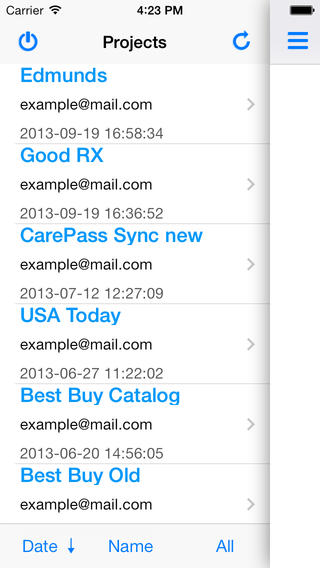
One of the best ways to test your mobile app is on the device. This is a must if your app uses native (PhoneGap) API such as the Camera or the Barcode scanner. Installing the app on the device after every small update is very time consuming. That’s exactly why we built the Appery.io Tester app. It’s a very simple app that allows you to launch your native app and test any native APIs without needing to install it each time. We had the Android version for some time now and now we have also launched the iOS version.

Install the app on your device:

Install the iOS version.
Install the Android version

Once the app is installed, sign in with the same credentials as you use for https://appery.io and you will see a list of all your apps. Simply select the app you want to launch and start testing! This allows you quicly to test any native APIs used in the app. If you make any changes to the app (in Appery.io builder), simply relaunch the app to get the latest version. It’s that simple.

Appery_io_tester_ios


For more information about testing your app, please visit Testing your app in documentation.