Appery.io at AnDevCon and Mountain View JavaScript Meetup

We just returned from app world conference in New York which was a great success. Next week we are heading to 2 more great events: AnDevCon conference and Mountain View JavaScript Meetup.

AnDevCon

Appery.io Mobile Apps Builder is going to be at AnDevCon II (The Android Developer Conference) in San Francisco Bay Area, November 6-9. Stop by our booth and learn how to build Android apps ready for the Android Market using cloud services, all in about 5 minutes. It’s really awesome, I promise.

Mountain View JavaScript Meetup Group

Building apps with Appery.io, A Cloud Service for Building Mobile Apps

Wednesday, November 9, 2011, 7:00 PM

In this cool session you will learn how to build HTML5 and native apps using Appery.io. Appery.io is a cloud-based mobile apps builder that uses HTML5, jQuery Mobile, REST, and PhoneGap to build apps. A real mobile app will be built during the session, which attendees will be able to run and test on their own devices.

Sign up to attend this Meetup.
Using jQuery Swipe Transition For Navigation In Your Mobile App

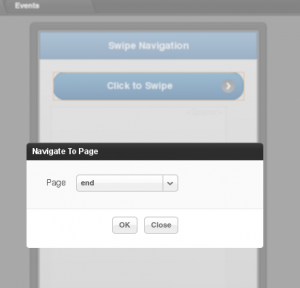
Navigating between pages in Appery.io is very simple. You first add an HTML event to a component, such as click for a button, and then add Navigate To Page action where you select the page to navigate:

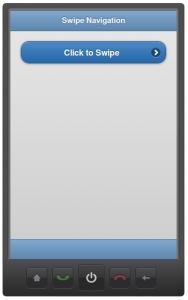
This works very well, but it will replace the entire page. An alternative way to navigate or transition between pages is to use jQuery swipe transition which in my opinion looks better. Here is how to do it. You use the same event, such as click for a button. Then, we add Run Custom JavaScript action with the following code:

navigateTo('end', 's');

The first argument is the page name. The second argument indicates that a swipe transition should be done. That’s it. You are probably wondering why not do this via Navigate To Page action? It will be possible soon. We are going to add a check box so you will be able to select what type of transition you would like, a page replace or swipe. For now, this is a very simple work around.

Want to try it?

Just scan this QR code:

Working With HTML Events Just Got Much Easier When Building A Mobile App

One of the key features in Appery.io is the ability to add HTML events such as value change, click, blur and others to components on the screen and then invoke any of the actions:

  • Set HTML Attribute
  • Set Property
  • Set Local Storage Variable
  • Navigate to Page
  • Navigate to Link
  • Open as Popup
  • Close Popup
  • Invoke Data Source
  • Run Custom JavaScript

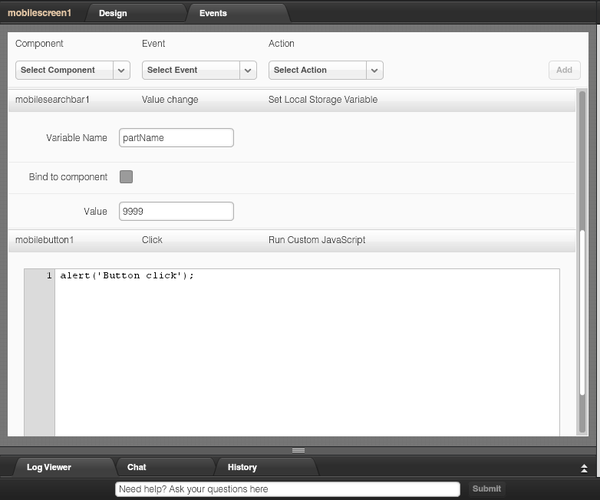
If there is a page that has numerous components with defined HTML events and action, then trying to view or edit a specific event/action requires selecting the component and then switching to Events tab (in Properties). Although it allows to view a particular event/action, it doesn’t give you a full picture, it doesn’t show other components and thier events/actions. Well, we made it much simpler now. A few weeks ago we introduced a new Events tab, which will show you all the HTML events and actions defined for all components on the current screen.

Above you can see two components and their events and actions. mobilesearchbar1 component defines value change event and Set Local Storage Variable action. mobilebutton1 defines click event and Run Custom JavaScript action.

To go back to the phone, simply click the Design tab.

As you can see, it’s much simpler now to view and edit HTML events and actions. And, you can also add new events and actions. Select the component, add event, pick and action and click Add:

Mobile App Prototyping With Appery.io – 5 Innovative Features [Article]

Ask anyone involved in making applications as a developer or a customer: Would you like to see how the app looks and behaves before we actually build it? The answer is an overwhelming yes. We humans are very visual. For us, to understand something better, we would rather look at a prototype than just read a description. That’s exactly why prototyping is hugely important today.

Even though prototyping is crucial to any project, a real prototype is rarely fully developed. Why? There are a number of reasons. First, lack of the right tools. Second, most of the tools that do exist today just enable you to create a static mockup. And third, some believe it’s a waste of time, as the real app usually looks very different from the prototype, so why even bother with it. These are all valid concerns, but a new prototyping tool solves these problems. This prototyping tool is Appery.io Mobile Apps Builder.

Appery.io is cloud-based service for building mobile apps. It enables you to quickly and easily build real mobile Web and native apps, entirely in the cloud. Mobile prototyping and prototype testing is a major part in this cloud-based service.

Continue reading: http://uxmovement.com/resources/innovative-features-in-tiggr-mobile-apps-builder/

Setting Custom Image Background For Your Mobile App

A number of users asked us how to use a custom image as background for mobile app. We are working on this feature but a simple work around exists. We want to run a very simple jQuery CSS query when the mobile screen loads. First, add load event to the screen. Then, add Run Custom JavaScript action with the following code:

$('div[dsid="mobilecontainer"]').css('background-image',
   'url("http://www.sdcblog.com/wp-content/uploads/2011/06/italy.jpg")')

I removed the Header and Footer parts and also looking for mobilecontainer1, as this is the content where I want to set the background image.

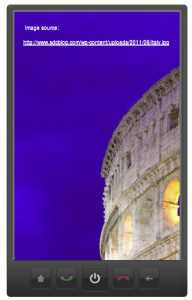
The result (click image to view the app):


Image source: http://www.sdcblog.com/2011/06/italian-artchitecture-bellissimo/italy/

Using the PhoneGap API in Appery.io App Development [Webinar]

PhoneGap is one of the foundation technologies for Appery.io Mobile Apps Builder. Appery.io extensive capabilities in JavaScript customization allow developers an easy way to use the PhoneGap API to make native apps that access device features (like using the camera). In this webinar, we’ll show you how it’s done with hands-on examples and then you’ll have the chance to ask questions.

Register for the webinar.

Appery.io: a simplified cloud service for building mobile applications [Article]

I’m sure you’ve heard about platform-as-a-service (PaaS) or cloud-based services like Google Apps Engine,CloudBees, Heruko, Engine Yard, and Cloud Foundry. All are excellent platforms that ease the process of managing, maintaining, and administering the platform on which an application you develop runs. Most tend to be focused on the hosting and managing side of the finished application. But what about a cloud-based service that enables you to build an app, and specifically a mobile app? Well, such a service already exists. The cloud-based service is called Appery.io Mobile Apps Builder.

Read the full article here:
Appery.io: a simplified cloud service for building mobile applications

Building BlackBerry Mobile Apps in Appery.io

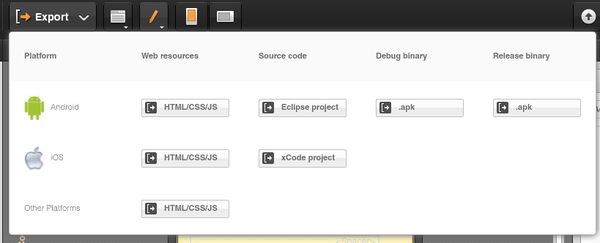
One of the most important features in Appery.io is being able to export the app as HTML5 mobile app, Android app or iOS native app. All export features are show by clicking the big Export button:

As you noticed, there is currently no BlackBerry option. But, it turns out it’s pretty easy to get a BlackBerry native app.

Any app in Appery.io, be it for Android, iOS or BlackBerry is built first with jQuery Mobile component, HTML5, JavaScript and CSS. Then, the app is packaged as native with PhoneGap. For BlackBerry, simply export the app as HTML/CS/JS, and to build a native we are going to use PhoneGap Build.

Here are the steps:

  1. Build an app in Appery.io (try getting started guides) and export it as HTML/CSS/JS
  2. Sign up for PhoneGap Builder. A free account is available
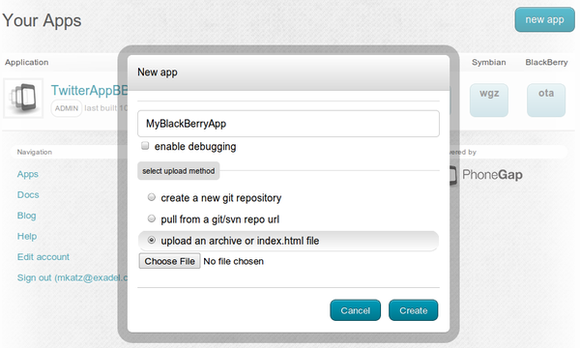
  3. Click to create a new app inside PhoneGap Builder.
  4. Enter app name
  5. Select upload an archive or index.html file option and point to the zip file you exported from Appery.io
  6. Click Create to build the app
  7. That’s it. You may have to wait a few seconds before the build completes.

Once the build is complete, you will should see this:

Building Mobile Apps with jQuery Mobile and PhoneGap [Webinar recording]

Our last we­binar, “Building Mobile Apps with jQuery Mobile and PhoneGap,” was a great suc­cess. If you missed it you can still get to a recording of it by fol­lowing the reg­is­tra­tion link and reg­is­tering (or just typing in your e-​​mail ad­dress if you’re al­ready registered.)

https://​www1​.go​tomeeting​.com/​r​e​g​i​s​t​e​r​/​2​3​6​5​8​1​769

Also, fol­lowing up on a ques­tion from this last we­binar, we’re putting to­gether a we­binar on using the PhoneGap API in Appery.io sched­uled for October 27th. Watch for more de­tails on the blog.

You Can Build A Mobile App Today—Yes, We Mean You [Article]