
Appery.io Mobile Apps Builder Upgrades with Brand New UI, New Export/Build for Android, iOS and Much More

Appery.io Mobile Apps Builder upgrades with brand-new UI and very cool new features.

Brand-new attractive UI

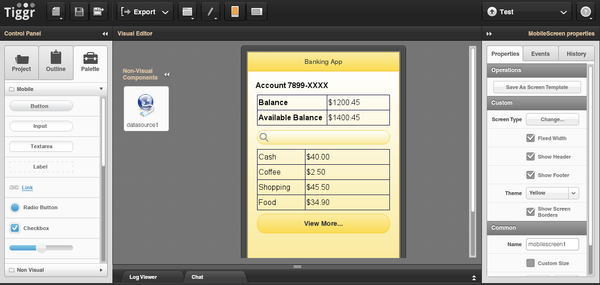
Appery.io Mobile Apps Builder got a new and very attractive UI. You can see how it looks below but the best way to experience it, is to log in or sign up. You will like it.
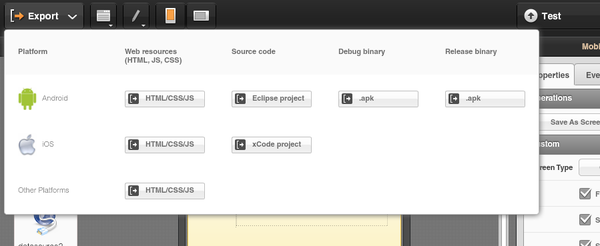
Upgraded export-and-build capability with support for Android, iOS, and mobile Web

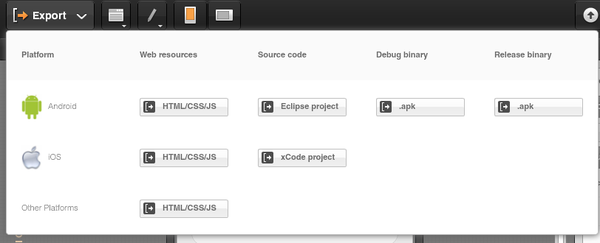
That’s big one. From the screen shot you can see that it’s now super easy to get the source code and build for Android and get the source code for iOS.
Android binary release (.apk) settings editor

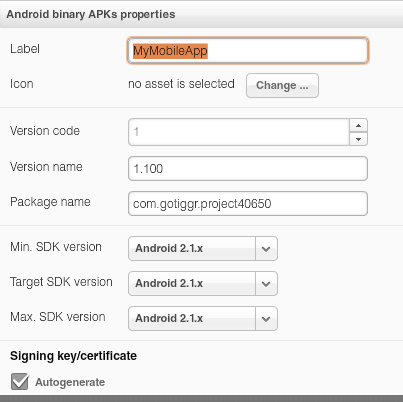
What’s really cool is that you get get an Android binary and immediately publish it to the Android Market. How can you do that? Appery.io has a new Android .apk settings editor where you can enter all the information needed for the Android Market.
Upgraded test capability. Quickly test your app in a browser or on a mobile device

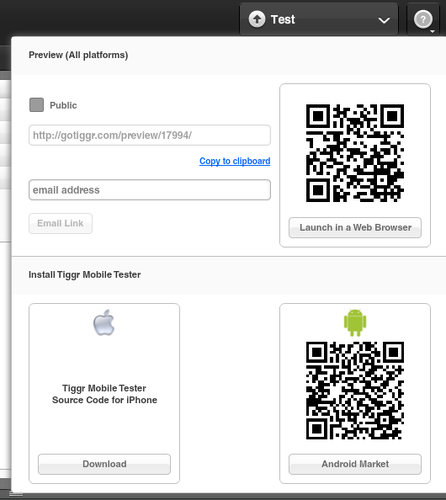
The Test screen has been upgraded. It’s now super easy to test the app in desktop Web browser, mobile Web browser, and on the actual device via Appery.io Mobile Tester.
Support added for REST XML services and for using the POST method

REST services are no longer limited to just JSON response format, Appery.io now supports XML. We have also improved ability to make POST requests.

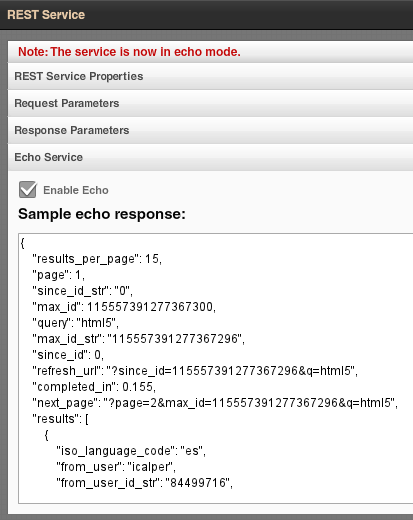
New service “echo” mode makes it possible to test the app without connecting to the actual service

To make it even easier to work with remote services, we have introduced an “echo” or mock service. Basically, instead of making a call to the actual remote service each time during development, you can invoke a local “echo” or mock service which returns a sample of the real data.
Use custom external JavaScript libraries in your app

To make it simpler to customise and use custom JavaScript, we have added a feature where any custom JavaScript library can be loaded and included in the app.

New Appery.io JavaScript framework to make it simpler to extend your apps with custom JavaScript

Check it out here.

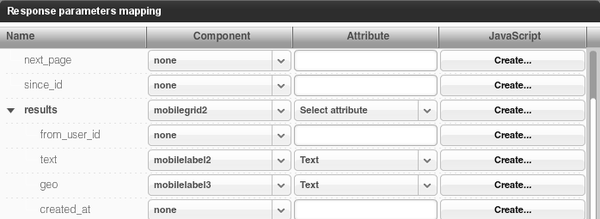
Create and use custom JavaScript functions when mapping service data to the UI

When mapping UI when data source, you can now specify custom JavaScript to run when the mapping occurs
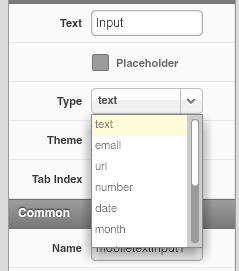
Improved support for HTML5 attributes and support for the HTML5 video tag

We have added HTML5 input types, attributes such as placeholder and HTML5 video tag.
New iPad screen layout

We added project template with iPad layout – to make it simple and faster build apps for the most popular tablet.
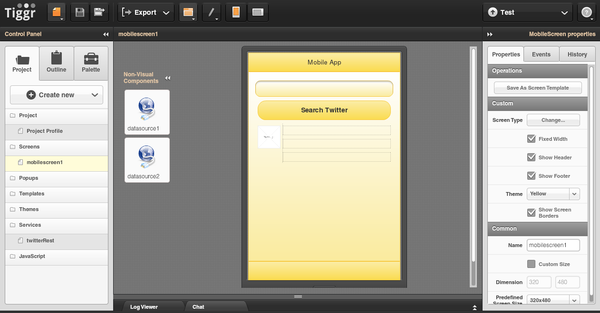
Sneak Peek of New UI and New Export Feature, Plus Slides

How to Test Native Android and iPhone Apps Quickly

(Reposted from Maxa Blog)

If you have have done native mobile app development on Android or iPhone (iOS) then you probably know that testing native apps is not that simple. On the other hand, testing traditional Web applications is pretty straightforward: Launch a Web browser, and you see exactly how the application works and how it looks. Read on and I will show how to test a native app in a similarly straightforward fashion after considering various alternatives.

Option 1: Installing the app on the mobile device

This option is great in that you can test the app on the actual device. However, getting the app on the device can be very time consuming. And, for each testing iteration, the app would have to be built, sent (or copied) to the phone, installed, and launched on the device. While you get to test on the actual device, the process is very slow. Just imagine if you need to make just a small change in the app.

Option 2: Using device emulators/simulators

Getting the app on a device emulator is simpler than getting the app on the actual device. However, now the app is not tested on the actual device, so you may not be getting exactly the same behavior or look-and-feel that you would get on the actual device. Now, this is more of an Android problem than an iOS problem. The Android emulator runs a bare-bones Android version. Most Android phones from HTC, Motorola, and Samsung have their own, slightly modified builds of Android (even the same browser can be slightly different on different devices). Another problems with emulators (mostly Android) is that they are usually much slower than the actual devices, for obvious reasons. While the iOS simulator is pretty fast, the Android emulator is notoriously slow.

The Best Option: Launching the app on the device without installing

I consider this final approach the fastest and most straightforward. It doesn’t require installing the app on the device each time, but you still get to test on the device. This approach uses the Appery.io Mobile Tester app on the device while the mobile apps themselves are developed using Appery.io Mobile Apps Builder.

This tester app only needs to be installed once. The Android version is here and the iOS version is available as an open source version. The app is rather simple. After signing in to your Appery.io Mobile Apps Builder account, it will show a list of all mobile apps (native and Web) created in your Appery.io account. Here is how it looks:

The most interesting part? Clicking (or tapping) on any project will launch the app. Make any changes to the app in Appery.io? Save the changes, and click the app in Appery.io Mobile Tester. You now get the new version, with all the changes. With this approach we get the best of everything. We don’t need to install the app each time, the app is tested on the actual device and last but not least, it’s very fast.

Still not convinced? Then sign up for Appery.io, create your first mobile app, install Appery.io Mobile Tester (Android or iOS) and test the app.

Building A Mobile App In 5 Minutes [Video]

This video shows how to build a Twitter search mobile app in just 5 minutes using Appery.io.

New Android Getting Started Tutorial: Building Hello World App

Yesterday we published a new Android Getting Started tutorial. It’s a very easy to follow, step-by-step guide on how to build a Hello World app and test in on an Android device.

Mobile Merger Event Coming Up Sept. 15

We’re ex­cited to be a sponsor of the Mobile Merger event coming up on September 15th on­line. It’s an in­ten­sive 1-​​day event to bring you com­pletely up to speed on in­cor­po­rating the in­cred­ible promise of mo­bile into busi­nesses now. All without having to travel any­where – it’s an on­line event!

It will in­clude 36 ses­sions cov­ering all as­pects of mo­bile in busi­ness: mar­keting, ad­ver­tising, de­sign, de­vel­op­ment, and more. Attendees have ac­cess to hours of on­line con­tent (in­cluding some from us) and the ability to in­teract live with speakers and other at­ten­dees. Find out more and then reg­ister. We’ll “see” you there.

Appery.io: Web-Based IDE for Building Mobile Apps And 15 Reasons Why It Deserves Your Attention

New Getting Started Tutorial: Building Weather App

New Mobile Apps Builder documenation site

Recent Appery.io Mobile Apps Builder reviews from around the web