Using Buddy API in Appery.io App Builder

Buddy is a cross-platform mobile “backend as a service”. In Appery.io app builder you can easily use any 3rd party REST API, including Buddy API. Every API is different and here is how to setup Buddy API. Buddy adds the actual action to invoke in the URL, after the ?, followed by any additional request parameters:

http://webservice.buddyplatform.com/Service/v1/BuddyService.ashx?UserAccount_Profile_Create&BuddyApplicationName=….&BuddyApplicationPassword=….

When setting up the service in Appery.io REST editor, set the URL to:

http://webservice.buddyplatform.com/Service/v1/BuddyService.ashx

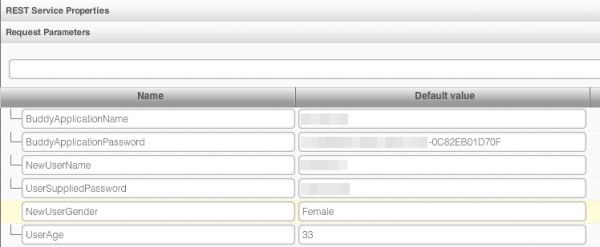
then define all other request parameters as usual:

Once you setup all the request parameters you will be able to test the service.

Using SQLite Database with Visual Data Mapper

If you want to use SQLite database, get data from the database and be able to use Appery.io visual data mapper, this post shows how to do it. It uses a Generic Service to get data from the database.

New Video: Instantly Add Cloud Database to Your App with New Database Integration Feature

New Tutorial: Using Database File API and User Management API

We just published a new step-by-step tutorial on using the File API and User Management. Give it a try and let us know what you think.

Eliminating Flickering When Navigating Between Pages

Earlier we blogged on how to eliminate flickering on Android when navigating between pages. This is a follow up post with additional tips.

There are plenty of different questions/solutions on how to resolve the flickering problem. We think the following is a pretty good general solution.

In the original post we mention Android but have heard since then that it also happens on iOS devices.

To resovle the flickering problem, add this JavaScript to your app (Project > Create New > JavaScript):

$.mobile.defaultPageTransition = 'none';
$.mobile.defaultDialogTransition = 'none';

Just in case you need to target a specific OS, you can modify the code like this (shown for Android):

if (navigator.userAgent.indexOf("Android") != -1) {
   $.mobile.defaultPageTransition = 'none';
   $.mobile.defaultDialogTransition = 'none';
}

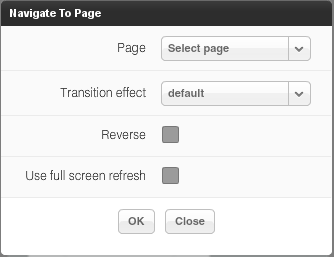
Once you add this code, you need to use only the Default transition for navigation. If you use any other transition effect, you will get back the flickering.

The next thing you can try is to hide the Ajax loader (shown on service invocation and page transitions). Project > Create New > CSS and enter this code:

#ajaxBusy {display: none !important;}

This should make transitions even smoother.

Lastly, you can also try what jQuery Mobile team suggests (see Important section in yellow).

Let us know if these workarounds work for you.

Developer Revenues: The Dilemma and the Opportunity of In-app Purchase and Carrier Billing

August Release: Database Integration, File API, Project Backup, and Simplified Project Creation

We just released some really awesome features in Appery.io!

App Builder Database Integration

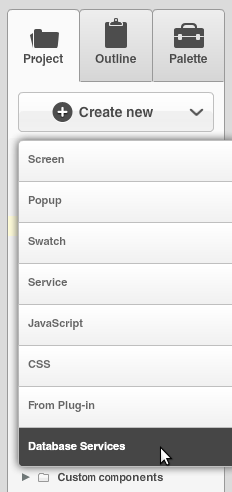
In early July we launched Appery.io Database where you can store app data. Now we have launched database integration in our app builder. This means you can point to a specific database, select the collection(s) you want to use and automatically generate all the REST services.  To create a services from database, select Create New > Database Services:
Next select the database:
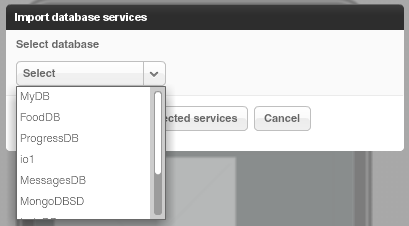
Once the database is selected, you can select the services for which you want to generate REST services.

The first section creates REST services for User management.

The second section lists all the collections you have in current database. You can then select which actions (Create, Delete, etc) you would like to create for a particular collection:
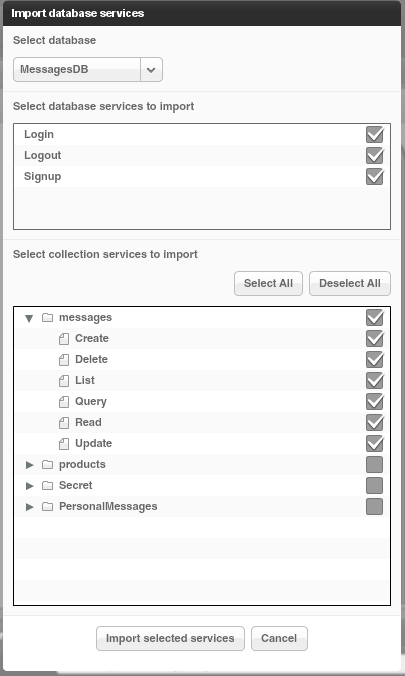
When you click Import selected services button, the following REST services will be generated:
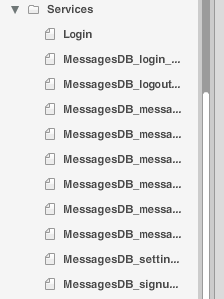
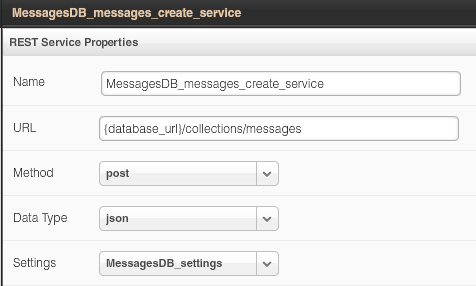
For example opening the service for creating a new message looks like this:
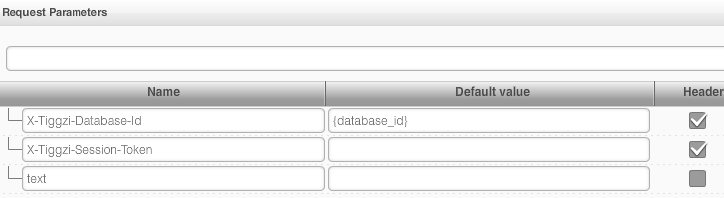
The request and response parameters are also generated.  Here is a screen shot of request parameters to create a new messsage:
Isn’t this awesome?

File API

We continue to add new features to Appery.io Backend Services by adding File API. You can now easily store files in the database. When you open any database, you will see a new Files tab:
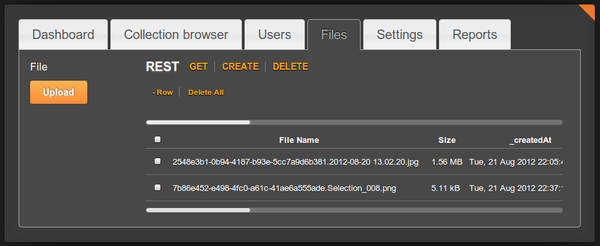
Read more about the File API.

Project Export/Import

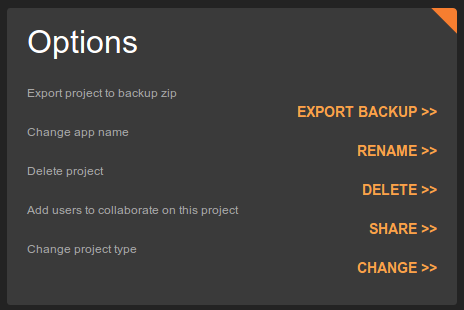
Our users have been asking for this feature for a long time and it’s now available. You can export and then import a project. To export a project, go to app options page (Export Backup):
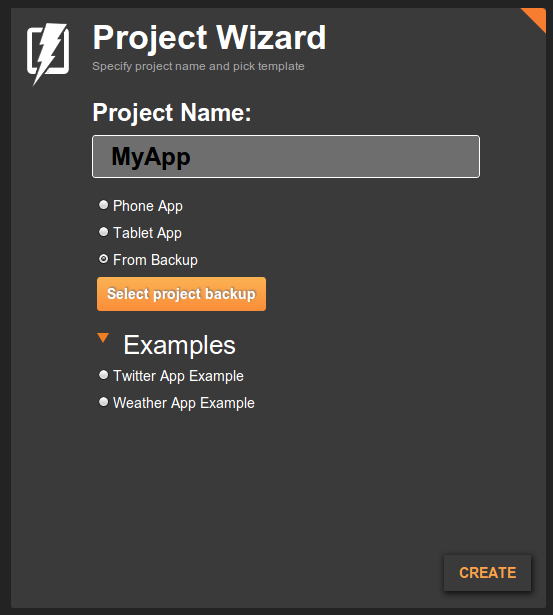
To import an app from backup, click From Backup when creating a new app (you get to this screen by clicking More Options link, see next section):
Even easier way to create a new app

Last, but not least, it is now even easier to create a new app. Right from Apps page, enter a new app name and click Create. That’s it.


Building RSS Mobile App Tutorial

Appery.io at HackDenver/AT&T Mobile App Hackathon

Appery.io Roadmap in August

In July’s release we updated our test page and also launched Appery.io Database. Here is what’s coming up in August:

  • Integration with Appery.io Database inside the app builder. When creating a new service, you will be able to point to any existing database collection that you created and auto-generate REST API services such as to display data, create data, or delete data.
  • Database: File storage API will allow to store files in the database.
  • Export/import of projects – our users have been asking for this for a long time.
  • Easier testing and installing: QR code on test page and on Android build page. Having the QR code on Android build page will allow you to install the app on your phone by simple scanning the code.
  • Easier project creation: create new app right from Apps page

Lastly, our very big new feature is our new HTML5 app builder we  have been working on for a few months now. I’ll be posting information on it soon.