What Happened with the Upgrade This Weekend

As many of you know, we attempted to upgrade our platform this past weekend and had to roll the update back because of technical issues we encountered.  We made the tough decision to roll back the upgrade because, although painful, it would be least disruptive to our customers.   What happened is not acceptable to us.  We are growing fast and many of you rely on our platform for your business.  We are conducting a review of our process to ensure we deliver with quality each time.

Is my account impacted and if so what should I do?

Fortunately, for most of you, there was no impact.  However, if you opened and modified one of your projects between the times of Sunday at 4 AM Pacific and Monday 5 PM Pacific, some of your updates may have been lost as we rolled back to the earlier release.   If you believe you may have lost some of your changes, there is a good chance we can help you recover them.   Please contact our support channels so we can help you.

I will say this again, what happened over the weekend is unacceptable. We are already looking at ways to improve new features roll out.  In addition to improving our internal process, we are also considering deploying a beta system to both get early feedback on new features and also improve the quality of our new releases.  Another idea we’re considering is enabling users to manually upgrade their apps to new versions of our App Builder, rather than automatically updating them.  This would give you more control over your projects.  I’d love to hear from you about these and other ideas you may have.  Please feel free to write to me directly at max@appery.io

Max and the Appery.io team.
Important Platform Update Today – Monday, May 26 (Updated)

Update: new times published

As you probably know we had an update over the weekend. A number of updates didn’t work the way we expected, and we are going to roll back some of the updates. We are very sorry about this.  This will ensure you can continue using Appery.io, and your apps will continue to run while we resolve out any remaining issues. Once everything is 100% resolved, will have another update in a couple of weeks.

We are going to start the update around 5pm Pacific Time, and it will last until about 10pm Pacific Time, Monday, May 26.

As always, please follow us on Twitter (@apperyio) for latest updates. Our support is always available on the forum and via email.  If you have any other question this update, please don’t hesitate to contact me directly at max@appery.io.

New Mapping

Update (May 27): links were unlinked as this content not currently available.

Appery.io developers: we just upgraded the mapping feature in Appery.io! It’s now a lot more powerful and flexible.  This post is a quick overview of what has changed. The two links (Mapping, Model and Storage) provide more details on the new features. Read this post and then visit the links to learn more.

  • Mapping
  • Model and Storage

Old mapping

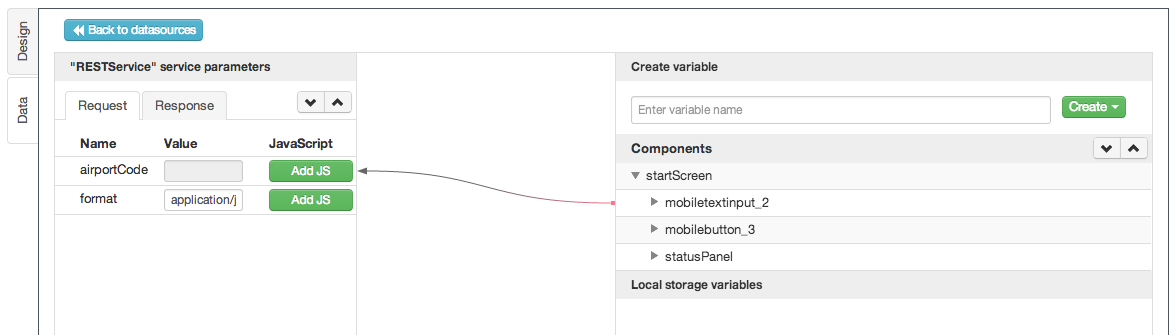
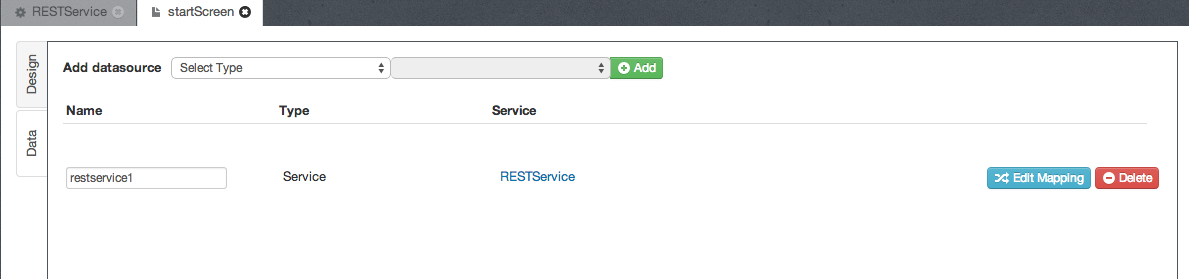
This is how the old mapping looked. This shows a data source (service) has been added to the page:

Screen Shot 2014-05-24 at 10.50.02 PM

Clicking on Edit Mapping, would open the service request mapping:

Screen Shot 2014-05-24 at 10.54.00 PM

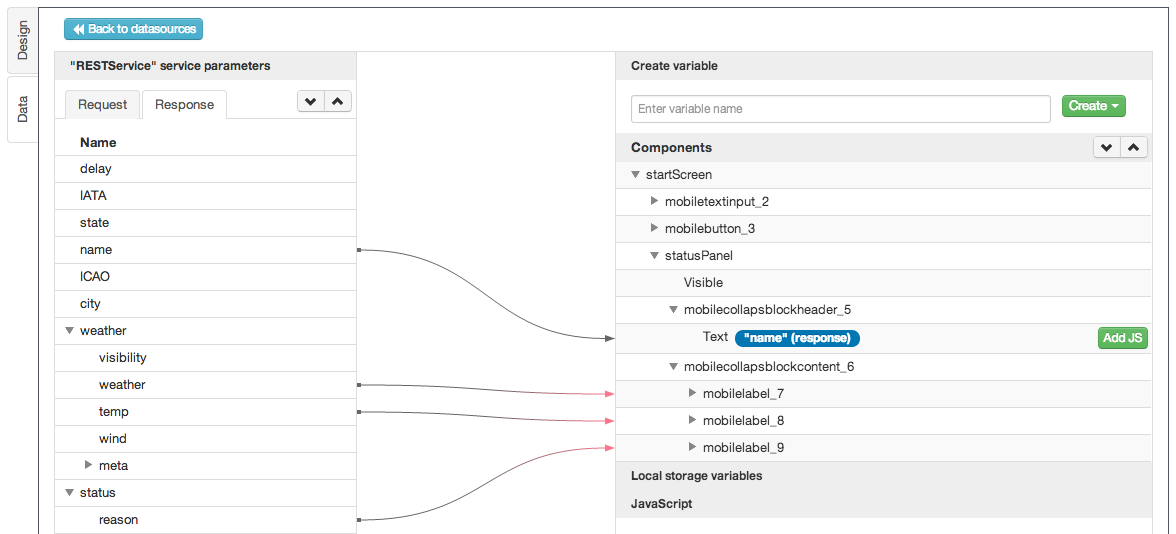
and this is service response mapping:

Screen Shot 2014-05-24 at 10.54.17 PM

New service events and mapping

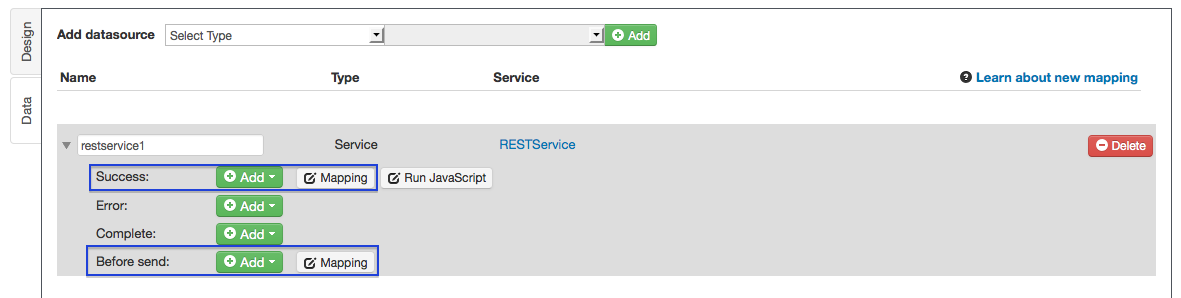
The new mapping is a lot more flexible and greatly simplifies building mobile apps in Appery.io. When you switch to Data view, a data source will now be shown like this. Make sure to click the expand arrow on the left to see the data source events:

Screen Shot 2014-05-24 at 10.57.04 PM

The mapping in Before send event and in Success event – that’s the exact the same old mapping Appery.io had before and the one you are used to. When a service was invoked, the request mapping would happen on Before send event and response mapping would happen on Success event.

As you can see what we have now is a lot more flexible. In addition to doing mapping, you can now also run any other action (click +Add button to see the actions), plus Run JavaScript which allows you to run any custom script. Plus, you can invoke any action on Error and Complete events. You can even run the new Mapping action on those events!

New Mapping action

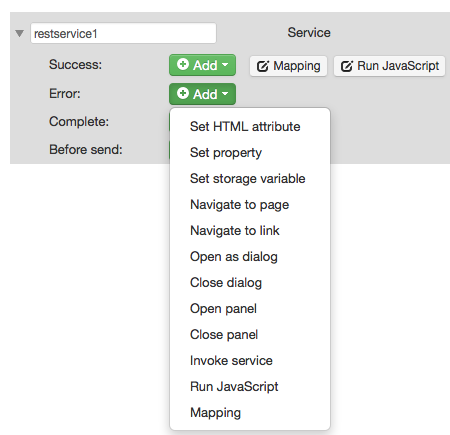
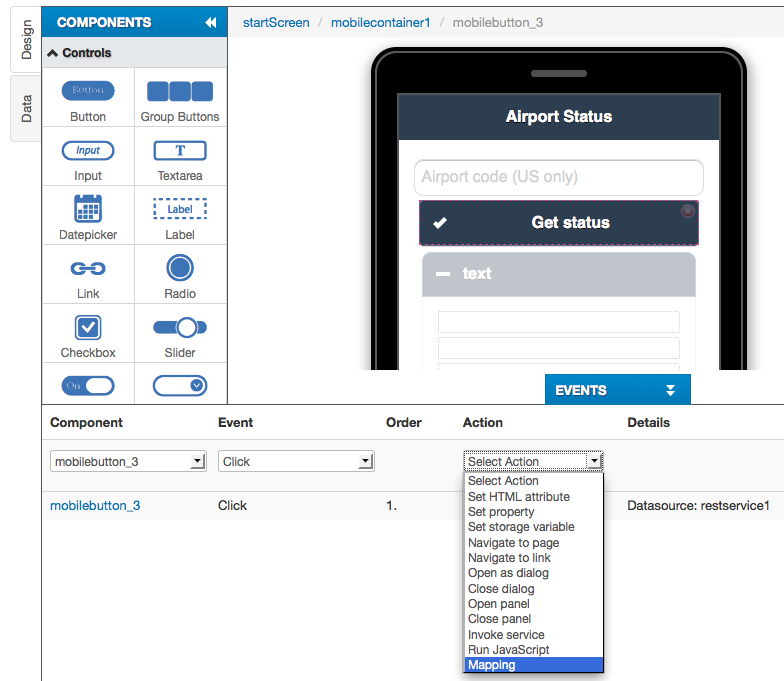
The new Mapping action allows you to invoke mapping on any event, not just on service invocation (last in the list):

Screen Shot 2014-05-24 at 11.08.13 PM

The new Mapping action can also be invoked from the UI:

Screen Shot 2014-05-24 at 11.22.07 PM

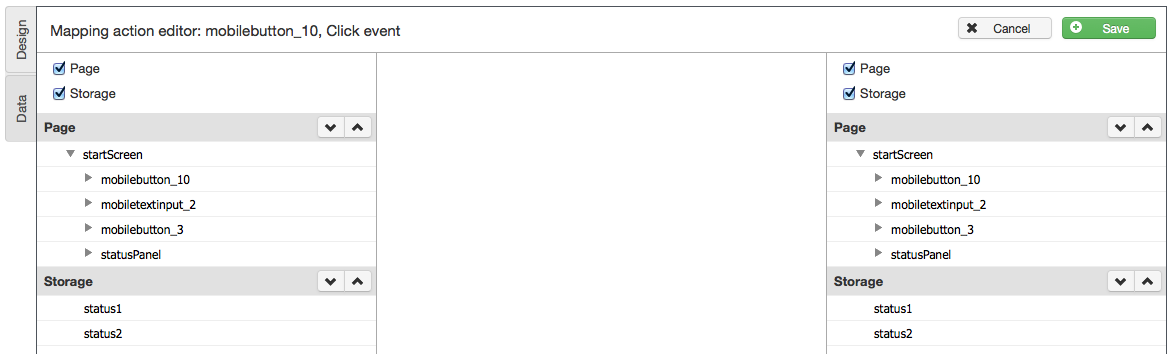
For example, on button click, you can move data from page to storage, or from storage to page:

Screen Shot 2014-05-24 at 11.24.24 PM

Mapping: page, service, storage

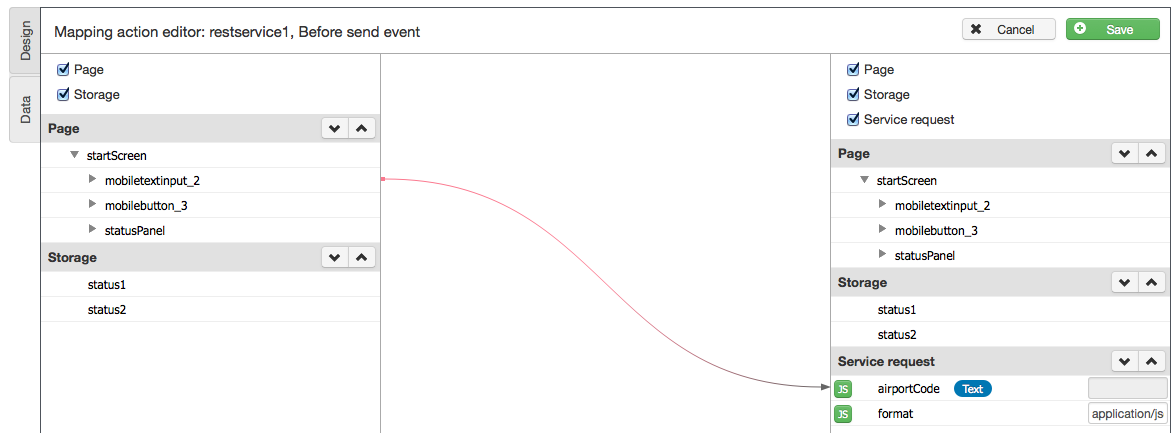
The mapping is no longer limited to service-page mapping. You can now map data between page, service and storage. This is where the new Mapping actions comes into play. Before you could only map between page and service. Now you can map between page and storage (local storage, session storage). In other words, you can map data from page into storage, or move map data from storage to page. Here is how the new mapping looks:

Screen Shot 2014-05-24 at 11.18.17 PM

Notice that on the left side there are: Page and Storage. On the right side there are: Page, Storage, and Service Request. With the new mapping, we have simplified mapping between Page, Storage and Service.

Documentation

Please read the following pages that explain in more detail the new features:

  • Mapping
  • Model and Storage


What Is an Appery.io App?

screen-shot-2014-04-29-at-8-32-24-pm

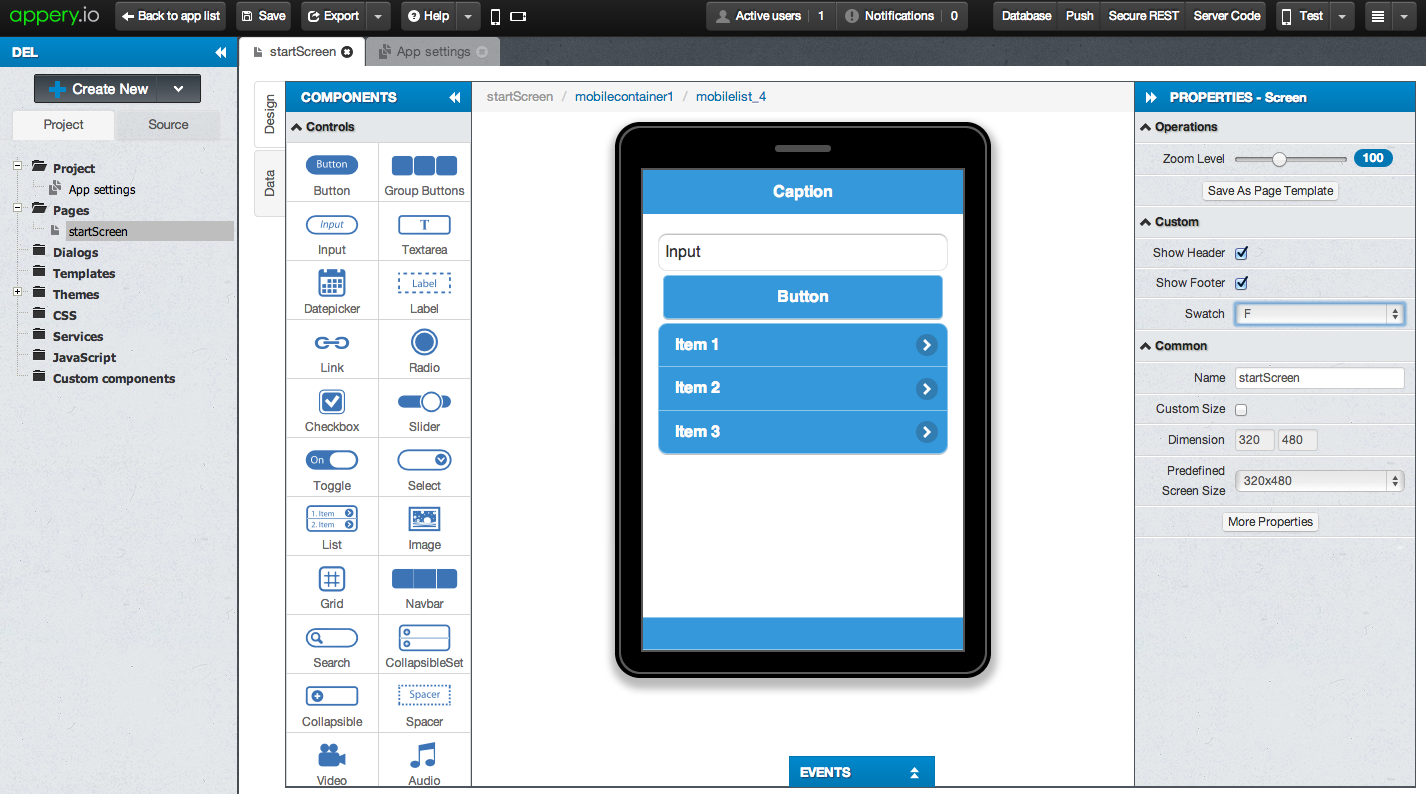
Appery.io is a cloud-based platform with visual development tools and integrated backend services. Appery.io provides powerful visual tools to build the app UI, but what’s the technology under the hood when you create the app? It’s pretty simple, the resulting app has:

  • HTML
  • JavaScript
  • CSS
  • jQuery Mobile
  • Any custom HTML, JavaScript, CSS added by the developer
  • Apache Cordova — for native APIs and hybrid app creation
  • Any custom Apache Cordova plugins

As you can see, it’s a pretty standard technology stack when you build an app in Appery.io.


Webinar: Learn How to Build Mobile Apps with Facebook API

Join the Appery.io webinar this Wednesday, at 11am (Pacific Time) learn how to build mobile apps with Facebook API.

App Owners Can Now Manage App Data and Send Push Notifications from User-Friendly Customer Console [Video]

This video shows how to build a mobile app and enable the Customer Console. The Customer Console allows an app owner who, (for example) owns a restaurant, or some other business, to:

  • Modify app data
  • Send push notifications to all app users
  • No need to ask or involve the app developer
  • Deploy the console to appery.io URL or a custom domain such as http://mybusinessname.com

Read more about the Customer Console.

Using Facebook API in Appery.io App

When building a mobile app in Appery.io, it’s very easy to use and connect to any APIs. Facebook provides one of the most popular and widely used APIs that you can as easily use in the app you build in Appery.io.

facebook-logo

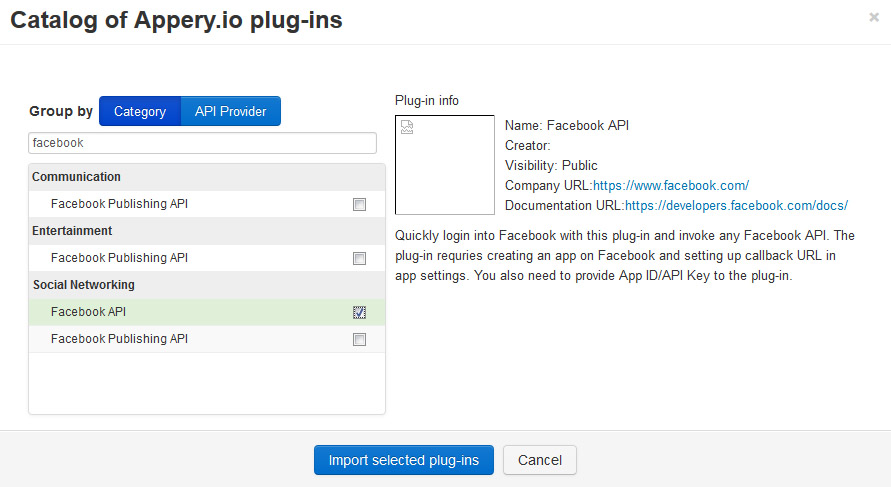
Appery.io provides a really simple out-of-box approach to pass the OAuth protocol and connect with Facebook. Before building the Appery.io app you need to register as developer with Facebook and create an app. Once it’s done, go to Appery.io builder and import the Facebook API plug-in:

fb_import_plug_in

Once the plug-in is imported you need to specify Appery.io app ID and Facebook app ID in the Facebook_Setting file that listed under the Services folder:

fb_settings

One more thing to do is change the Start Page in App settings to Facebook_Login. After that you can test the app. You’ll see the Login to Facebook button, clicking on which will dial the OAuth log-in dialog, where you should enter your Facebook login and password. After successful authentication, information about you will be displayed at the Facebook_Me page:

fb_me_page

All of the Graph API features can be used the same way, but note, that some actions requires certain scope. You can change default scope parameter in the Facebook_Helper JavaScript file:
fb_tutorial_helper

That’s it, you can now invoke any available Facebook API.  Go ahead and see how to post a wall message in our detailed Facebook tutorial.

TADHack: Compete for $30K+ in Prizes From the Comfort of Your Home

We have Partnered with TADHack – a global event to discover the latest ways to add communications to apps, services and business processes to create powerful customer experiences.    Use Appery.io to build your hack of course… You’ll have a chance at $30K in prize money and other prizes, including full year subscriptions to Appery.io.   You can join this global event from the comfort of your own home, or in person in Madrid, Spain; Colombo, Sri Lanka; Pune, India; and Kuala Lumpur, Malaysia.

Check out some of the developers getting involved on the even’s blogRegister for the hackathon and get your developer spotlight.

If you want to learn and network rather than hack you can do that too. There will be investors, enterprise CIOs, Telcos, press, customer experience designers and many more coming to TADHack to learn how communications creates world class customer experiences and exciting new services.

TADHack will run over Friday and Saturday the 6th and 7th June 2014 . Here is the agenda. Keynotes include Mark Shuttleworth, the founder of Ubuntu, technology visionary and second space tourist.  Here are some of the developer resources for your hacks.  Hacks can use Telecom APIs, WebRTC, messaging, location, payments and much more.  You’ll even be able to hack your calls.  Its going to be a unique and exciting event – and with Appery.io, you’ll have a competitive advantage!

Sign up for the hackathon and good luck in the competition.

Appery.io platform adds speed, server jobs, Google Analytics, Windows Phone build, Customer Console, more Webhooks, and many more features

The Appery.io team released a number of really cool features over the weekend. Here is what’s new.

It’s faster

We made a lot of things go faster. You will see a big app builder speed improvement (and we are still not done, more speed is coming).

Easily schedule server-side jobs

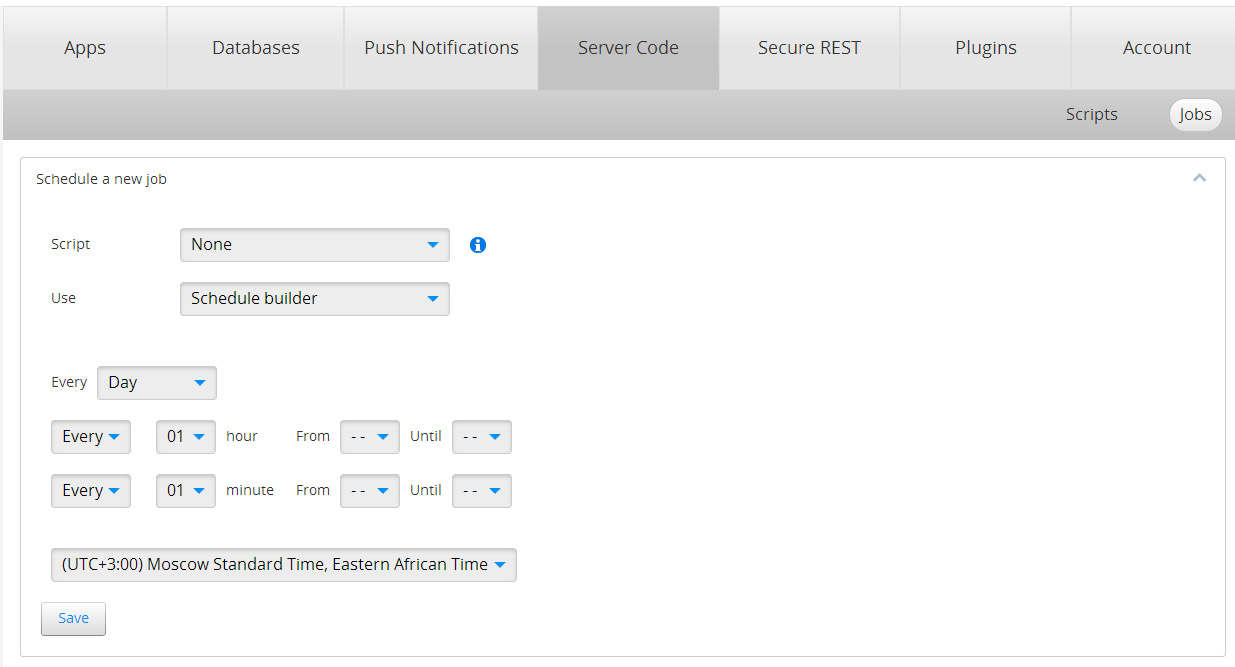
You are building an app that needs to check for inventory once every hour or once a day? Now you can easily do this with new Server Code scheduler feature. Because this is a server-side script, the actual device can even be offline, but the script will still run. You pick a script and just set the schedule to run:

server_code_jobs_tab

Manage app data and send push messages with Customer Console

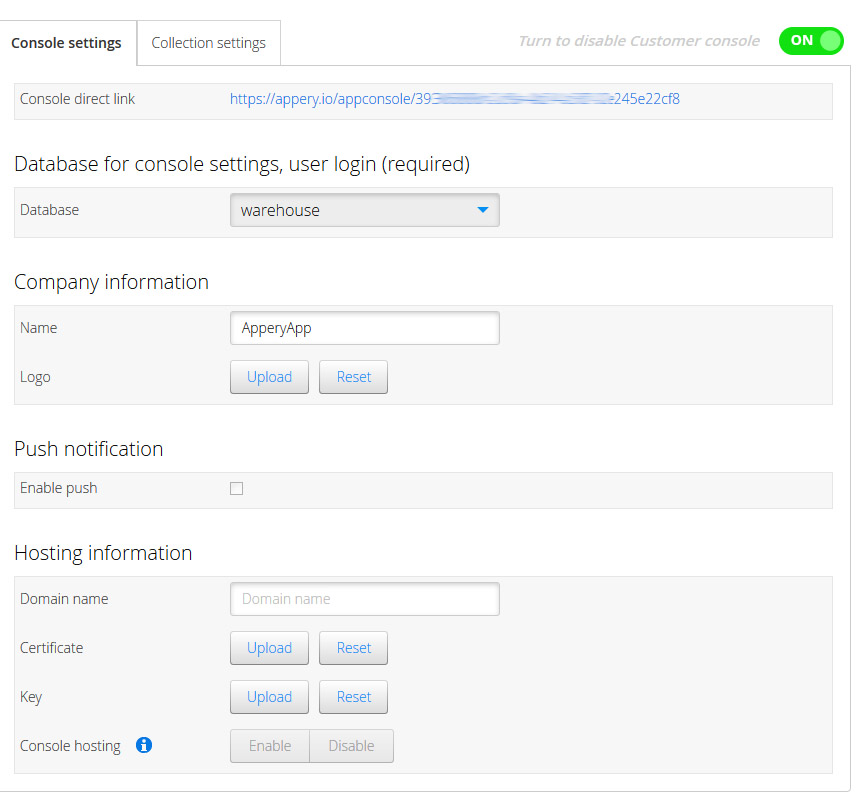
Built a restaurant app for a client and would like the restaurant owner to manage the menu or send push message for special promotions? Now you can easily create a special Customer  Console for an app and let the client manage the app data and push messages. With the just launched Customer Console, the client can edit app data (data from database), and send push notifications, all from a user-friendly console (and you don’t need to be involved). You can even publish the Customer Console to a custom domain.

customer_console

Get app insight with Google Analytics

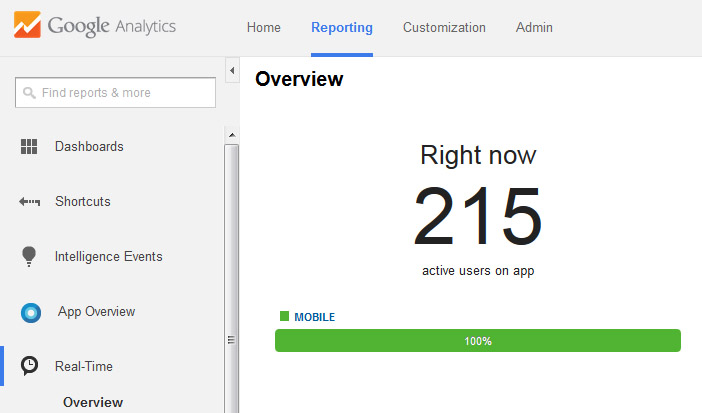
Now you can easily collect statistics from you app by using the Google Analytics. Watch how many users use the app, or analyze data for certain periods. All the power of the Google Analytics is in your Appery.io app:

google_analytics

Styling the app with CSS is easier and faster

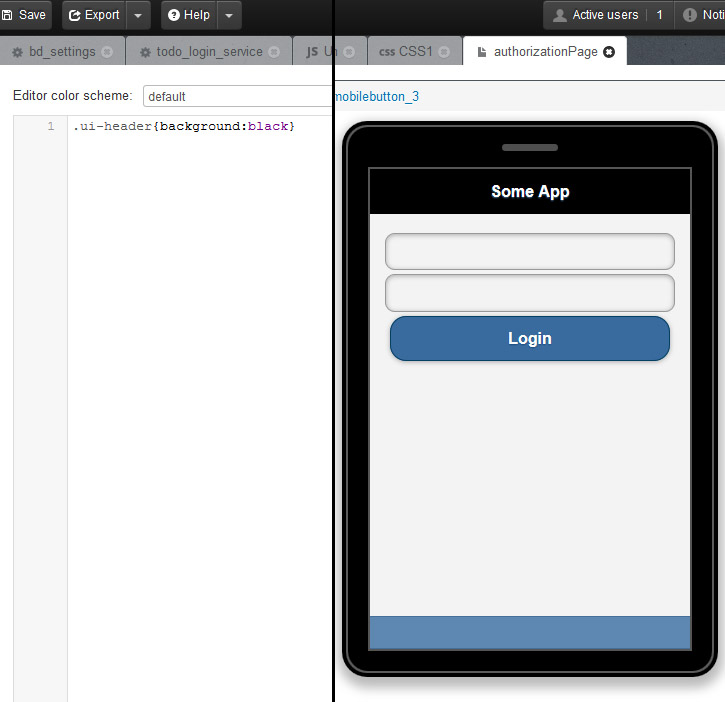
Earlier, when working with CSS  you have to test your app every time you want to see the changes. Now, you can see all the changes based on your CSS files directly inside the Appery.io app builder without the need to launch the app in the browser. Just write or edit the CSS and switch back to page to see the result:

css

Manage binary certificates in one place

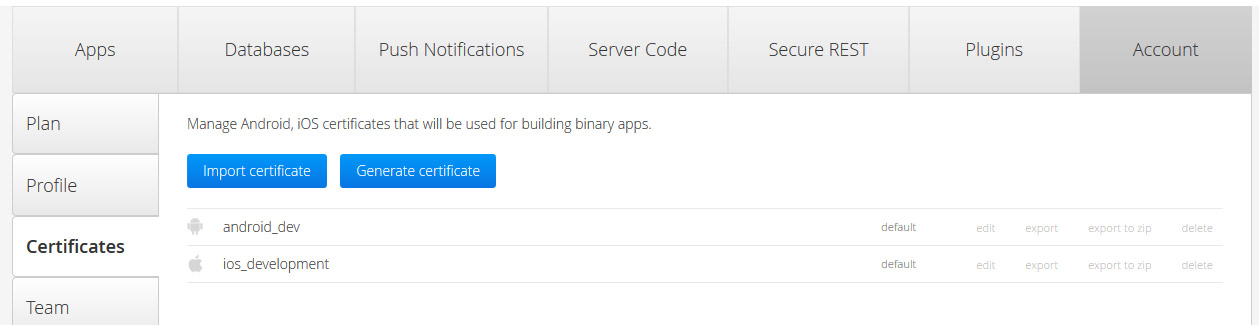
New and convenient certificate management tool helps keep all certificates in one place. Mark certificate as default to be used by all apps, or choose a specific certificate for an app in Project > App settings. As before, you can auto-generate Android certificates inside the Appery.io platform:

certificates

Quickly build and deploy for Windows Phone

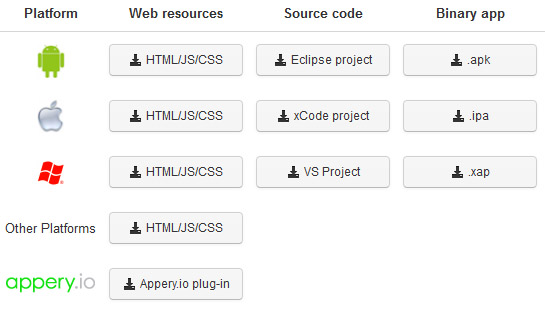
Need to build a binary for Windows Phone? It’s now as simple and fast as building for iOS and Android:

exportin_the_app

Customize and integrate more with additional Webhooks

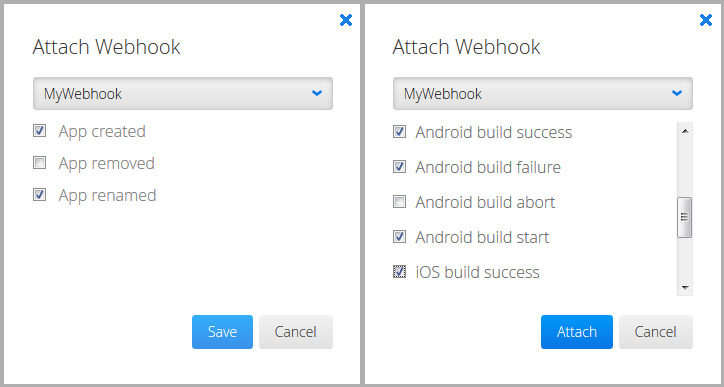
We launched Webhooks in January to allow easy integration with other systems. In addition to app specific events (right screen shot), we just added account-wide Webhooks (left screen shot) such as App created, App removed and App renamed. With new Webhooks, you get more options to integrate with other systems:

webhooks

Custom domain HTTPS hosting

Appery.io apps can be hosted on custom domain, and now the custom domain options also supports https.

As always, if you have any questions, feedback or comments, feel free to contact us at support@appery.io, post something on our forum or ping us on Twitter.

Using Google Maps API in Appery.io App

Google Maps is probably the most popular map widget used in the mobile apps today. Working with Google Maps in Appery.io app builder is very easy but as the same time is not very different than using other dev. tools. To add a Map component, simply drag and drop it from the palette onto the page:

google_maps_api

Rename the Map component to google_map. This is done so it’s simpler to reference the component from code.

Next you can create your own JavaScript class and define map variable as following:

var map;
function initialize() {
    map = Apperyio("google_map").gmap;
    if (!map)
    {
        setDelay();
    }
    else
    {
        directionsDisplay = new google.maps.DirectionsRenderer();
    }
}

function setDelay()
{
    setTimeout(initialize, 50);
}

Google Maps is usually loaded asynchronously, so the approach with delay (as mentioned in code above) can be handy. This will ensure the map is completely loaded before you try to use it.

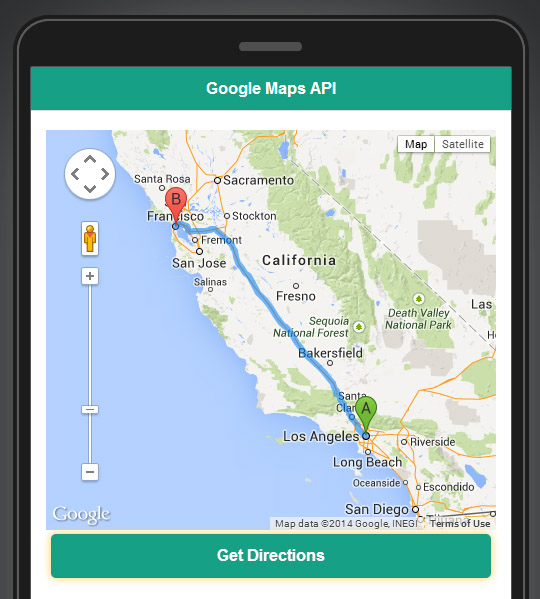
Generally that’s all you need to use Google Maps JavaScript API. All the actions you want to do next you can make based on Google Maps JavaScript API. Lets say you want to show direction from point A to point B. Place the button on the page and run following JavaScript by clicking on it:

var directionsDisplay = new google.maps.DirectionsRenderer();
var directionsService = new google.maps.DirectionsService();

var request = {
origin: 'Los Angeles',
destination: 'San Francisco',
travelMode: google.maps.DirectionsTravelMode.DRIVING
};
directionsService.route(request, function(response, status) {
directionsDisplay.setMap(map);
if (status == google.maps.DirectionsStatus.OK) {
directionsDisplay.setDirections(response);
}
else
{
alert("Directions query unsuccessful. Response status: " + status);
}
});

The directions will be shown on the map:

google_map_directions

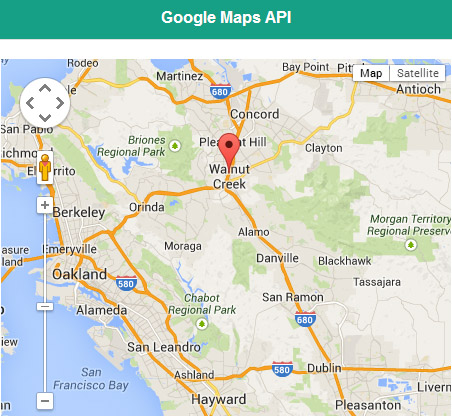
To place the marker on the map you should provide latitude and longitude values of a certain point. Try to run following JavaScript code and you’ll see how the marker drop on the map:

var markerLatLng = new google.maps.LatLng(37.913597,-122.066059);

var marker = new google.maps.Marker({
    position: markerLatLng,
    map: map,
    title: "Walnut Creek, CA",
    animation: google.maps.Animation.DROP
});

added_marker

You can also place markers based on geographical names, not latitude and longitude. In this case you should use Google Geocoding services, to convert user-friendly names to latitude and longitude values. Create a REST service in the app builder with the following URL:

https://maps.googleapis.com/maps/api/geocode/json

You’ll get a coordinates (latitude/longitude) as a response of this service, and you of course can use them to add markers.

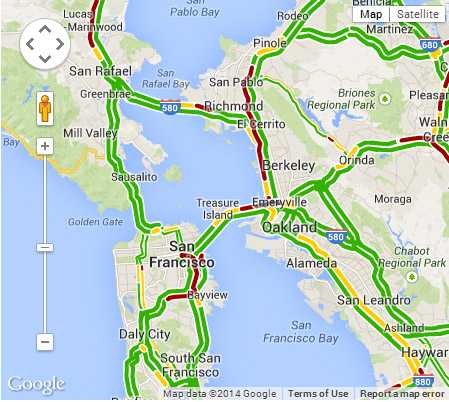
Any layers provided by Google Maps can be added too. Here is an example for Traffic layer, just run this code by clicking on the button:

var trafficLayer = new google.maps.TrafficLayer();
trafficLayer.setMap(map);

Traffic layer in action:
traffic_layer

As you can see using Google Maps and its API is very straightforward in Appery.io app builder. Check out our Google Maps section for more detailed tutorials.