Mobile Tip: Dynamic REST API URLs in AngularJS Apps

dynamic_urls

Dynamic URLs are very common in any mobile app. When building AngularJS apps with Appery.io there are few ways to make parts of the URL (or even the entire URL) dynamic. We’ll use this URL for our example: http://mywebsite.com/name/{id}/edit , where the {id} part should be dynamic.

  1. First of all, you can use the Settings service to perform dynamic substitutions:
    1.  Create a new Settings service (if you don’t have one yet) by going to CREATE NEW > Service > Settings (REST settings).
    2. Then, create a new id parameter in the newly-created Settings and provide a value for it.
    3. Now, go to your REST service, and change the dynamic part of your URL to {MySettings.id} where MySettings is the settings service name, and id is the name of the parameter. Your URL should look like:           http://mywebsite.com/name/{MySettings.id}/edit
  2. Alternatively, you can create request parameters directly in the REST service. They will be automatically substituted if names coincide. You can use this approach if you need visual Mapping for dynamic parameters:
    1. Go to your REST service Request > Query String.
    2. Create the new id parameter and provide a value for it.
    3. Change the REST service URL to http://mywebsite.com/name/{id}/edit.
    4. Because the value of the id parameter will be automatically inserted to the {id} placeholder, it won’t be added to the end of the URL as a query string.

Read more about the REST and Settings services in AngularJS.

Make sure to check out all of our mobile development tips.

Do you want to build apps fast? Start developing with our trial plan!
New Nonprofit Case Study: Bharatiya Mahila Federation (Thane Samiti)

Screenshot3About the Organization

Located in Maharashtra, India, the Bharatiya Mahila Federation (Thane Samiti) [Thane District Chapter] is an Indian charity dedicated to improving the lives of Indian women. They are an affiliate of one of the oldest Indian women’s organizations, the National Federation of Indian Women (NFIW).

The organization helps women and children in a multitude of ways, from running family counseling centers to putting on street plays to highlight women’s struggles against poverty and violence.

Problem

The organization needed to solve a dire social problem: Many Indian cities have a large percentage of their population living in crowded and congested housing without individual bathroom facilities. The people living in these conditions rely on poorly maintained community facilities, which are usually built by local governmental authorities.

The people who use the facilities cannot afford to spend hours or days navigating the bureaucracy to file a complaint about the conditions and manage repair requests. Further, the complaint resolution process is complicated, with little accountability.

Solution

The organization decided that there must be a better way to file complaints and request maintenance: a mobile app. Cell phones are widely used in India, with about 75% to 80% of the population using them. The rationale is that even amog poorer populations, some people in these areas will have smart phones, which can be used to file and monitor complaints.

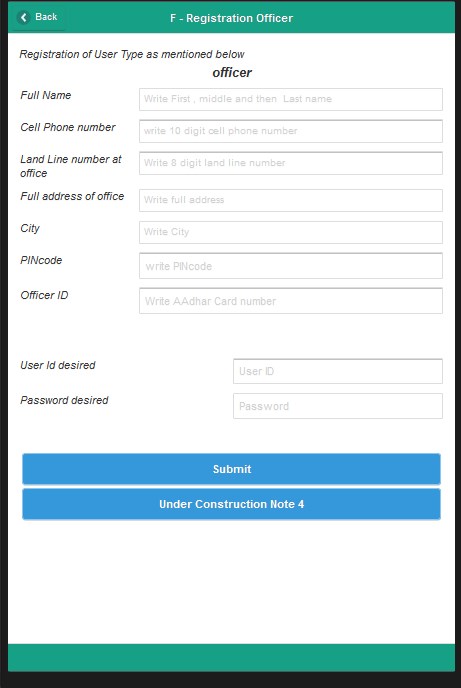
The organization designated Appery.io as the platform they’d use to build their app, which they will offer to the affected municipalities. The app will have four modules: a citizen module, a municipal officer module, a contractor module, and an initial facility survey module.

The goal, according to Dr. D.G. Mahajan, a volunteer with the organization, and creator of the app, is to facilitate repair and maintenance of the facilities.

After investigating the best methods to build the app, Dr. Mahajan decided to go with Appery.io. He cites a number of reasons for his choice:

  • It comes with immediate access to essential components such as GPS, Camera and Map features.
  • It offers a hosted solution for development and the final app, and allows for easy app testing.
  • Its excellent training materials, user forum, and support.

Further, Dr. Mahajan says, the platform’s learning curve is short, and the platform itself is flexible, giving developers the ability to build an app via a visual editor and edit the source code.

Results

Over 42,500 people are projected to use the app to file and manage complaints in Mumbai alone. If the app is successful, the organization plans to expand its reach into other Indian cities.

According to Dr. Mahajan, the success of this app will mean improvement in the lives of tens of thousands of people: “If we are successful in reducing the number of unusable facilities due to maintenance issues, then that is a benefit to people living in low-cost areas.”


Appery.io News: Price Increase, Gartner AADI Conference, Education News & More!

Price Increase Coming November 8th – Subscribe or Upgrade to Lock In Today’s Price!

On November 8th, 2015, we will be revamping the online pricing for the Appery.io platform. All the details are available in this post on our blog, but here are the main highlights:

  • A new 14-day free trial of the Pro plan will replace the free Starter plan.
  • A new Team plan will replace the Premium plan.
  • We have updated our Basic, Standard, and Pro plans along with our pricing for developer seats.
  • We have also added some custom enterprise offerings.

Read the rest of this entry »

Mobile Dev. Tip: Simplify UI Building with Outline View

outline_view

Outline view

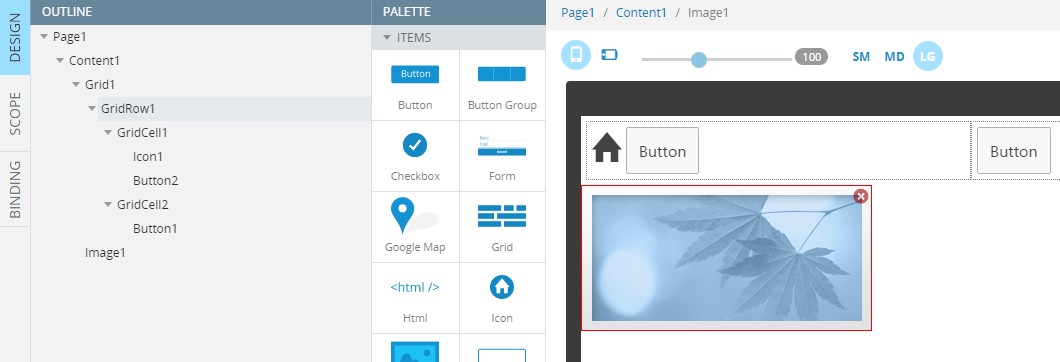
When building complex UI for your mobile app, it can become difficult to quickly select needed components. It can be even more complicated if there are many levels of nested components. A Grid component, for example, contains rows and columns, while each cell contains Buttons, Images and HTML. Some cells can even contain another Grid. By using OUTLINE view you can see the UI structure in simple hierarchical way. You can open or hide OUTLINE view by clicking the button to the bottom of the screen, nearby the components palette.

Make sure to check out all of our mobile development tips.

Do you want to build apps fast? Start developing with our trial plan!

Learn How to Schedule a Server Code Script to Run Periodically to Send a Push Notification

Appery.io Server Code enables mobile developers to write any custom app logic that is automatically exposed via a REST API. You develop the script using JavaScript (which is nice, since you don’t have to learn a new language). Server Code provides built-in APIs to make it easy to integrate with other Appery.io services. For example, you can query the Appery.io Database, send a push notification, and invoke any 3rd-party REST API service.

For example, let’s say you want to develop a script that will query a products database. If an inventory for a particular product falls below a set number, you want to send a push message to a manager notifying him or her that inventory is low.

Read the rest of this entry »

Understanding AngularJS Dependency Injection in Appery.io Apps

Dependency Injection (DI) in AngularJS is one of the core capabilities of the framework. You simply specify on which objects a particular controller depends, and AngularJS will automatically (and somewhat magically) inject those objects into your controller without you needing to do anything. In other words, you are going to get a reference to the objects that you need without doing any work.

Read the rest of this entry »

Mobile Dev. Tip: Conveniently Manage Dependencies in Your Mobile App

dependency_manager

Appery.io Dependency Manager

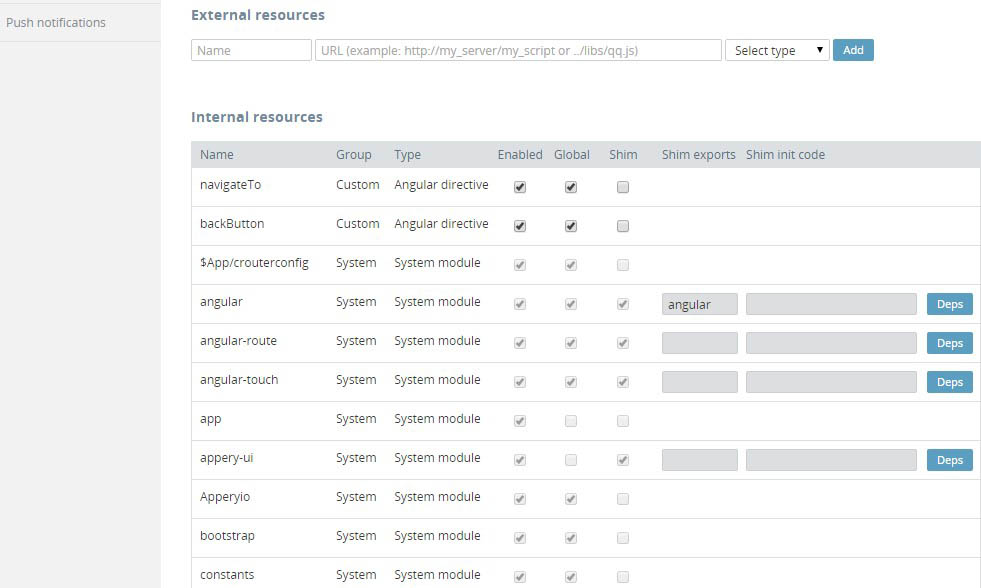
Another great built-in Appery.io tool is the powerful Dependency Manager. It can be used to add new dependencies to your app, manage the asset loading order, add initial logic for dependencies, and much more. You can load resources any time it is required in the project (not only while loading the app). This can be configured in a simple, visual way with the Dependency Manager.

Make sure to check out all of our mobile development tips.

Do you want to build apps fast? Start developing with our free plan.

Video Tutorial: Learn How to Build an App with a Barcode Scanner and SQL Database

In this video tutorial you will learn how to build a mobile app that allows you to scan a product barcode and save it into a relational database. The tutorial covers:

  • Connecting to a relational database
  • Exposing the database via REST APis using Appery.io API Express
  • Designing the app UI with the Appery.io visual App Builder
  • Generating REST API services
  • Using and binding API services in the app
  • Testing the app on device using the Appery.io Tester app

Learn from other videos on our YouTube channel.

Learn How the App Builder Simplifies Creating and Working with AngularJS Controllers

We created the Appery.io platform to make mobile app development simpler and faster. At the beginning of this year we added support for Ionic and AngularJS. Both frameworks enable users to build native-like apps with HTML, JavaScript, and CSS. If you’ve built with AngularJS before, you know that the AngularJS controller is one of the key components in the framework. There is usually one controller behind each page. The controller provides the logic for the page and connects the view (page) with the model.

If you were coding by hand, here is how a very simple controller might look:

angular.module('myApp')
   .controller('MyController', function($scope) {
      // controller logic goes here...
});

When you are building your app in Appery.io, the App Builder will automatically create a controller for every page. This way you don’t have to worry about the “plumbing” of the app and can concentrate on the app logic. Plus, it saves time (developers love to save time). Let me show you how this works.

Read the rest of this entry »

Mobile Dev. Tip: Quickly Map Data Between Services and UI Using Visual Mapping and Binding Editor in AngularJS Apps

apperyio_binding

There are two powerful and convenient ways to use data flow management in Appery.io: Mapping and Binding.

Mapping

When a REST service is invoked, it usually requires input data. In most mobile apps, the data comes from the page (user-entered) or from storage (previously saved). When the service is invoked, it returns the data you want for further actions with it. This is when Mapping comes really handy — you can map input and output data via a simple and intuitive drag&drop system. You can also modify the incoming and outgoing data on-the-fly by adding custom JavaScript to a needed element.

Binding

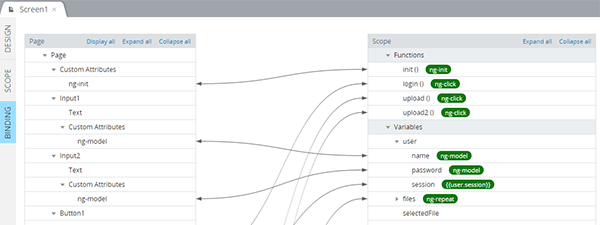
AngularJS apps support automatic data synchronization between the model and view components. When the model changes, the view reflects the change, and vice versa. It’s called data-binding. Appery.io provides Binding — the visual tool for managing the connections between UI components and scope. By going to the BINDING tab you can see an overview, and add or remove connections via the simple drag&drop system.

Make sure to check out all of our mobile development tips.

Do you want to build apps fast? Start developing with our free plan.