Sharing Appery.io prototypes
There are multiple ways to share a Appery.io prototype project. One of the first features in Appery.io was collaboration. During prototype design you can invite anyone to collaborate with you on the prototype in real time. You can invite a colleague working from home or a remote team in another country. There is a even a chat feature. Another way to share is to send a link to the Web Preview of the prototype. This is great if you want to show how the prototype looks in a web browser to a customer. We recently launched another way to share the prototype (the old school way). You can export the entire project into a zipped HTML bundle file and then share the file. Web Preview version (HTML/JS/CSS) will be generated for each screen in prototype and zipped together.
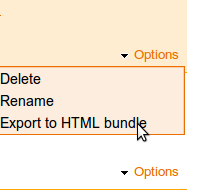
From Projects page, select Options/Export to HTML bundle: